

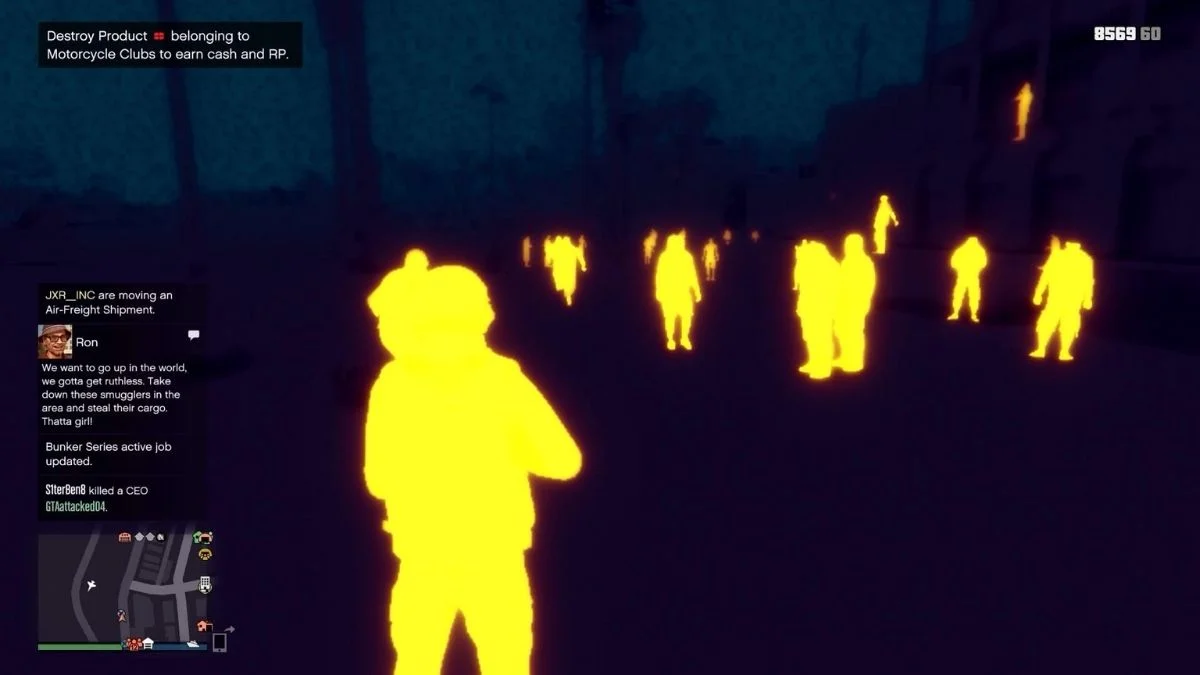
Thermal Vision in GTA Online may seem like a small thing at first, but it can be incredibly useful during gameplay. It allows you to see heat signatures clearly so you can spot enemies easier at night, inside dark buildings, or even from far distance. Many players ignore it early but once you learn how it works it is very useful.
Here is a simple guide on how to get and use thermal vision in GTA Online.
How To Get Thermal Vision In GTA Online
Thermal vision is not one device. Specific combat helmets are included. Buy one at a mask or a clothing store. The beach mask shop near the pier is a popular store but helmets can also be found in other clothing stores.
While you are in the store:
- Open the Hats or Helmets category
- Look for Combat Helmets
- Focus on helmets with four lenses
This is important. Dual-lens helmets usually give night vision, and quad-lens helmets give thermal vision. The preview image normally has a bluish tint so it supports heat detection.
All quad-lens helmets do the same thing, but the price can vary. Even the cheap one works perfectly.
How To Use Thermal Vision Helmet
But buying the helmet is just the beginning. You still have to get it properly equipped.
Open the Interaction Menu and select:
- Appearance – Accessories – Helmets
- Select your quad-lens helmet and wear it. After that, make sure the visor is pulled down. If the visor stays up, thermal vision will not work.
This is a small detail many players miss.
How To Turn Thermal Vision On And Off
Once the helmet is equipped correctly, you can activate thermal vision easily.
There are two simple ways:
- Use the quick toggle button for instant activation
- Or use the Interaction Menu again to activate it manually
The fast toggle method is faster during fights and missions. If the shortcut is not responding, manual activation works fine.
When activated, characters and heat sources light up in bright colours, while the environment looks cooler and darker. Then you can see movement quickly this way.
Best Times to do Thermal Imaging
In some situations thermal vision is very helpful:
- night fights and dark operations
- PvP fights with enemies hiding behind cover
- Stealth Play – Tracking Players Silently
- Heist setups or survival missions with poor lighting
It also helps during free roam if you want better awareness of nearby players.
Many experienced players keep a thermal helmet ready because it can give a small but important advantage.
You Can do this also
A few small tips can improve your experience:
- Always save the helmet in an outfit slot for quick access
- Practice switching vision fast during combat
- Combine thermal vision with good positioning
- Do not rely only on it, awareness still matters
These small habits make gameplay smoother.
Also Read: GTA Online MC Business: Best Solo Sell Guide (2026)
