

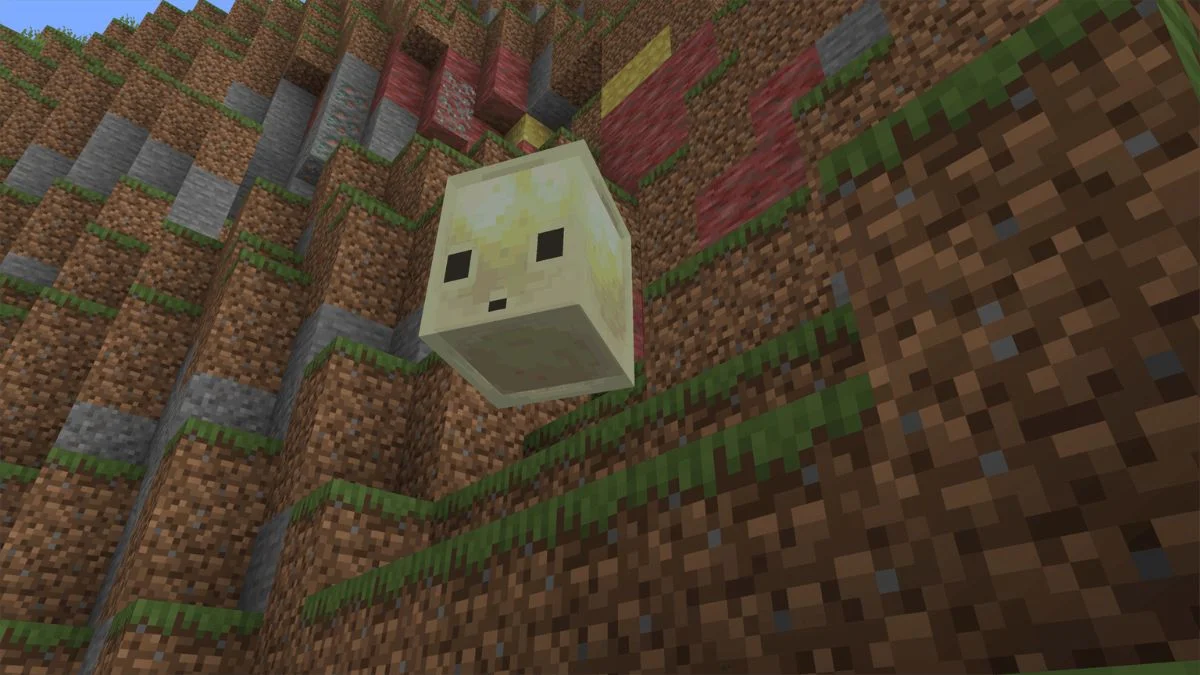
Today, Minecraft releases the second game of the year, Chaos Cubed. There was much talk about this game for a long time, and rightly so, because it is impressive. Cool new elements, new mobs, new blocks. You can even see what the world looks like from underneath.
When does it come out?
If you are in the US, the update should go live between 8 AM and 10 AM Pacific time. That is the window Mojang has been using for past drops, and it looks like they are sticking with it. So set your alarm if you want to try this out.
Here is when to expect it based on where you live:
- Mountain Time (MT): 9:00 AM to 11:00 AM
- Central Time (CT): 10:00 AM to 12:00 PM
- Eastern Time (ET): 11:00 AM to 1:00 PM
- GMT / UTC: 3:00 PM to 5:00 PM
- British Summer Time (BST): 4:00 PM to 6:00 PM
- Central European Summer Time (CEST): 5:00 PM to 7:00 PM
- India (IST): 8:30 PM to 10:30 PM
- Japan (JST): 12:00 AM to 2:00 AM (next day)
- Australia Eastern (AEST): 1:00 AM to 3:00 AM (next day)
Why are fans so excited?
Mahjong switched it up a few times back. They changed from one big update each year to smaller updates more frequently, about four times a year. They call those drops in games. The idea is to keep the game feeling fresh without keeping people waiting forever for new content. And so far, people seem to really like it. Each drop has something new, without too much of any one.
Chaos Cubed is the second drop of 2026 and it’s looking like one of the more interesting ones. The name gives away the theme pretty clearly. Cubes, chaos, lots of sulfur.
Meet the Sulfur Cube
The big star of this update is a new mob called the sulfur cube. If you have ever played with slimes in Minecraft, you will kind of know what to expect, but the sulfur cube takes things a step further. Like slimes, it is cube-shaped and bounces around. But that is where the similarities end.
There are different sorts of sulfur cube, and they all behave differently. There’s a bouncy one that jumps really high, a quick one that slides around quickly, a sticky one that can trap you if you get too close, and an explosive one that, well, you can probably guess what that one does. This gives the mob a lot of variety, which is great, because it means no two encounters with a sulphur cube will be the same.
The good news is that all versions of the sulfur cube are passive by nature, meaning they will not come after you unless you go looking for trouble. So you can explore around them without having to constantly fight them off. That said, the explosive variant is probably one to keep your distance from, just to be safe.
Sulfur Caves and the World Below
In addition to the new mob, Chaos Cubed also changes the look of some of the underground areas. The update introduces sulfur caves to the game, which are just what they sound like. These are cave systems with strong sulphur theme, with yellow tones, new blocks and, of course, sulfur cubes hanging around in there.
These caves are naturally generated when you load into a new world or explore areas you have’n’t visited in an existing one. If you want to find them, just go down below and start digging. You’ll know you’re close when the blocks start looking different.
Sulfur Pools on the Surface
The changes aren’t just underground, either. Chaos Cubed also adds sulphur pools on the surface of the world. These small pools are surrounded by sulphur blocks and cinnabar blocks that make them look different from the typical landscape. They are a nice little detail that makes the world feel more alive and diverse.
Cinnabar is one of the new blocks added in this update. It has a reddish look that contrasts nicely with the yellow of the sulphur, so the pools should be fairly easy to spot once you know what you’re looking for.
How to Get the Update
Getting the Chaos Cubed update is simple. If you already have Minecraft installed, just open your launcher and it should update automatically. If for some reason it does not, check for updates manually in your launcher settings. The update is free for everyone who already owns the game, just like all past game drops have been.
Once it is downloaded, you can either start a brand new world to see all the new generation features from the start, or jump into an existing world and explore new chunks to find the sulfur caves and pools. Either way works fine.
Also Read: How To Unlock Minecraft Builder And Crafter Capes Fast
